
Matterport for Your Industry
Capture a space once. Access it from anywhere.
Matterport creates an immersive, measurable digital twin of your building — allowing you to view, measure, document and share your spaces without going to site.
From construction and facilities management to property marketing and large building portfolios, discover how Matterport can work for your organisation.
Select your Industry
to find out how Matterport can work for you
Get Matterport working for your business
Whether you need to capture one building or hundreds, Asset 3D can help you get the most from Matterport.
Capture yourself
Purchase a Matterport Pro3 and give your team the ability to capture, document and measure spaces whenever you need.
We’ll capture it for you
From a single property to a national portfolio, our experienced team can capture your buildings anywhere across Australia.
Facilities & Asset Management
Your buildings. Always within reach.
Give your facilities team an immersive, measurable digital record of every building you manage.
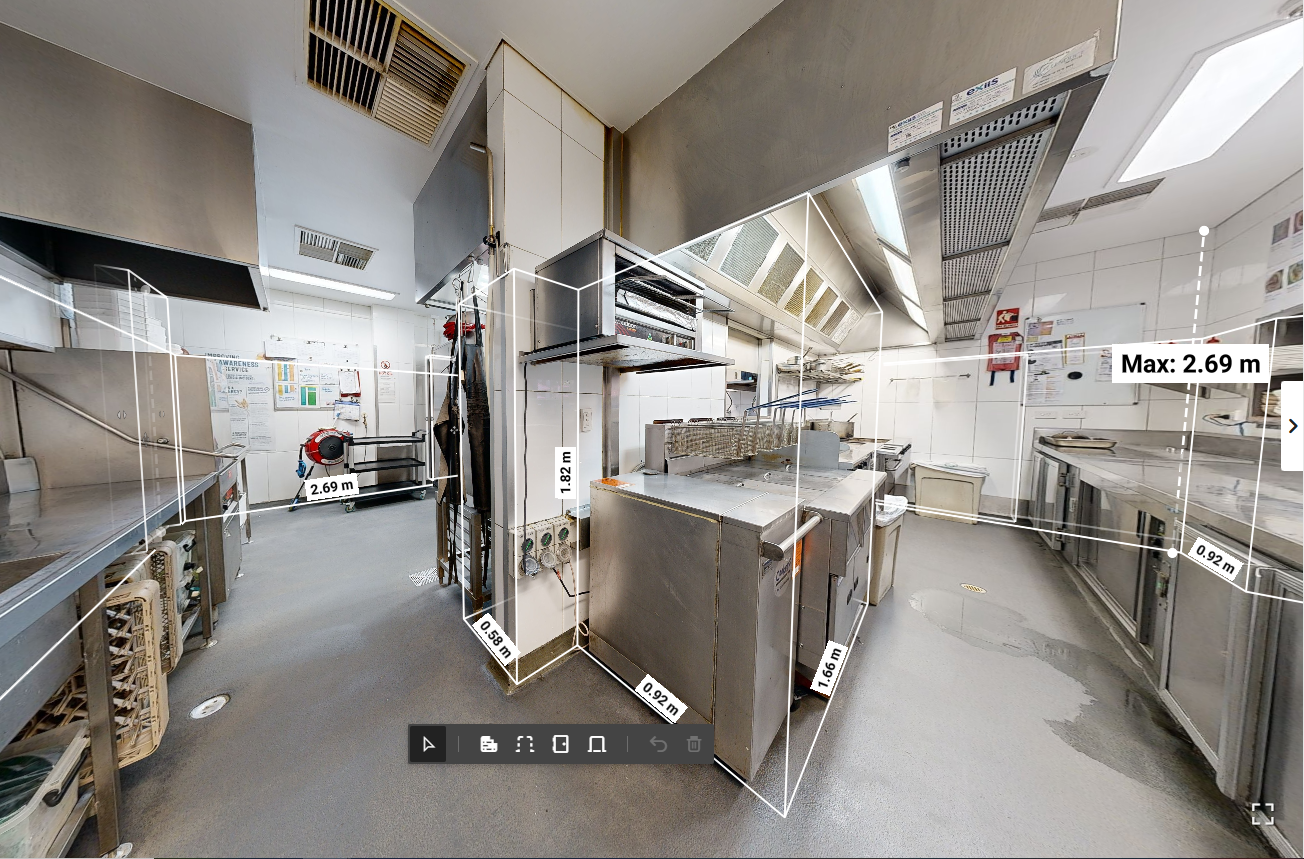
With Matterport, you can view a building, take measurements, check existing conditions and share access with contractors or consultants, without going to site.
Use your Matterport Digital Twins to:
View buildings remotely
Take measurements with the click of a button
Share spaces with contractors before they attend site
Scope maintenance and refurbishment works
Record the location of plant, equipment and building assets
Add notes, information, photos and links directly within the building
Maintain a visual record of buildings across an entire portfolio
View it. Measure it. Without going to site.
See how easily a Matterport Digital Twin can give facilities and asset managers remote access to their buildings — allowing you to explore a space, check dimensions and share information with your team or contractors, all from your desk.
Tom from Asset 3D shows how it works.
Architecture, Construction & Fit-outs

Capture existing conditions. Work from anywhere.
Matterport gives architects, builders and project teams an accurate, immersive record of a building before, during and after construction.
Capture a site in 3D, then return to it from your desk whenever you need, walk through the space, take measurements, share it with your project team or use the captured data to create drawings and models.
Use Matterport to:
Capture and document existing building conditions
Take measurements remotely
Reduce repeat site visits
Share sites with architects, consultants, contractors and clients
Document construction progress
Capture areas before they are concealed by subsequent works
Export point cloud data for use in CAD and BIM workflows
Create Existing Conditions floor plans, elevations and reflected ceiling plans
Maintain a permanent visual record of the project
Click the above image to learn more about the Matterport E57 high-density point cloud file.
Need drawings from your Matterport capture?
Already captured the building? Share your Matterport Digital Twin with Asset 3D and we can turn the captured data into Existing Conditions documentation for your next project.
Depending on your requirements, outputs can include:
Dimensioned Existing Conditions floor plans
Reflected ceiling plans
Internal and external elevations
DWG files
Point clouds
BIM / Revit models
Or, if you don't have a Matterport Pro3, we can capture the building for you and provide the complete package.
Capture your projects with the Matterport Pro3
For architects, builders, fit-out companies and contractors who regularly need to document existing buildings or construction sites, owning a Matterport Pro3 gives your team the ability to capture a site whenever you need it.
The Pro3 combines LiDAR scanning with high-quality imagery to create a measurable Digital Twin that can be viewed and shared online, with point cloud and other data outputs available for downstream CAD and BIM workflows.
Commercial Property

Market it. Inspect it. Manage it.
Matterport gives prospective tenants and buyers the ability to explore a commercial property from anywhere, providing a much better understanding of the space, layout and dimensions before arranging an inspection.
But the value doesn't have to end when the property is leased or sold.
A Matterport Digital Twin can also provide owners, property managers and contractors with a detailed visual record of the building — allowing them to revisit the property, take measurements and plan works remotely.
Use Matterport to:
Create immersive virtual inspections for leasing and sales campaigns
Allow interstate and international prospects to inspect remotely
Give prospective tenants a better understanding of layout and dimensions
Take measurements directly within the Digital Twin
Share properties easily with clients, consultants and contractors
Document the condition and layout of a property
Plan fit-outs and refurbishment works remotely
Maintain a visual record for future property and facilities management
Government & Councils

Showcase venues. Reduce unnecessary site visits.
Matterport allows councils to showcase community venues online, giving prospective hirers the ability to explore the space, understand the layout and check facilities before arranging an onsite meeting.
For venue hire teams, this can save significant time by answering many of the initial questions remotely.
Matterport Digital Twins can also support facilities and asset management by allowing council teams and contractors to remotely view buildings, take measurements and plan maintenance or works.
Use Matterport to:
Showcase community halls, function rooms and other hire venues
Help prospective hirers explore venues before visiting
Reduce unnecessary onsite meetings and inspections
Share venues easily with event organisers and suppliers
Give facilities teams remote access to council buildings
Take measurements and plan maintenance or refurbishment works.
Schools & Education

Open your school to families.
Matterport gives prospective students and families the ability to explore your school online, helping them understand the campus, classrooms and facilities before they visit.
Beyond marketing and enrolments, the same Digital Twin can provide facilities teams with a detailed visual record of the school for maintenance, planning and future works.
Use Matterport to:
Create immersive virtual school tours
Showcase classrooms, facilities and specialist learning areas
Help prospective families explore before attending an open day
Give facilities teams remote access to buildings
Share spaces with contractors and consultants
Take measurements and plan maintenance or refurbishment works
Create a consistent digital record across multiple campuses
Mining & Industrial
Access the site without being on site.
Matterport creates a detailed Digital Twin of industrial facilities and operational sites, allowing teams, contractors and consultants to explore the environment remotely.
Use Matterport for remote site access, inductions, project planning and documentation — helping reduce unnecessary travel and time spent onsite.
Use Matterport to:
Conduct virtual site inductions and familiarisation
Give contractors and consultants remote access before attending site
Take measurements and review existing conditions remotely
Plan maintenance, upgrades and refurbishment works
Document plant rooms, workshops and industrial facilities
Share sites with project teams anywhere in Australia
Maintain a visual record before, during and after works
Retirement & Aged Living

Help families explore before they visit.
Matterport allows prospective residents and their families to explore villages, accommodation and shared facilities online, giving them a better understanding of the environment before arranging a visit.
The same Digital Twins can also support facilities teams with remote access to buildings across the village or portfolio.
Use Matterport to:
Showcase accommodation and shared facilities online
Help families explore remotely before visiting
Provide an immersive view of the village and its amenities
Give facilities teams remote access to buildings
Take measurements and plan maintenance or refurbishment works
Share spaces with contractors and consultants
Create a consistent digital record across multiple locations
Residential Real Estate

Give buyers the freedom to explore.
Matterport Virtual Tours allow buyers to walk through a property online, understand how the rooms connect and get a genuine feel for the home before they inspect.
Give every listing an immersive, always-open inspection that buyers can explore from anywhere, at any time.
Use Matterport to:
Create immersive 24/7 virtual inspections
Help buyers understand the layout and flow of the property
Reach interstate and international buyers
Allow buyers to revisit the property after an inspection
Showcase premium listings and unique properties
Share tours across property portals, agency websites and social media
Generate floor plans and marketing content from the same capture
Travel & Hospitality

Let guests explore before they arrive.
Matterport allows guests to experience your property online before they book — exploring accommodation, facilities, function spaces and amenities in an immersive 3D Virtual Tour.
Give potential guests, event organisers and travel planners a better understanding of your property and the spaces you have to offer.
Use Matterport to:
Showcase hotels, resorts and accommodation
Create immersive tours of rooms, suites and facilities
Promote function, conference and event spaces
Help guests explore amenities before booking
Give event organisers a better understanding of layouts and spaces
Share tours across your website, booking channels and social media
Car Sales

Accessibility: People who can’t get to your dealership or are looking at vehicles outside of your opening hours can now get an in-depth view of your vehicles.
Powerful Branding: More and more car buyers now do initial research online. Having Virtual Tours available on your website (or carsales.com.au) helps you stand out from other dealers and draw in customers right from the beginning of their purchasing journey.
Drive your marketing budget further: a Virtual Tour means your vehicles are available to browse at any time and anywhere your customers are.
We recommend: placing QR Codes in the car window linking to your tour, adding tags with all of the vehicles notable features, links to sales/enquiry pages, etc.